Kedify at KubeCon 2026: Explore autoscaling and rightsizing with our team
 All Posts
Many vClusters, One Kedify Autoscaling Control Plane
by Jan Wozniak
October 14, 2026
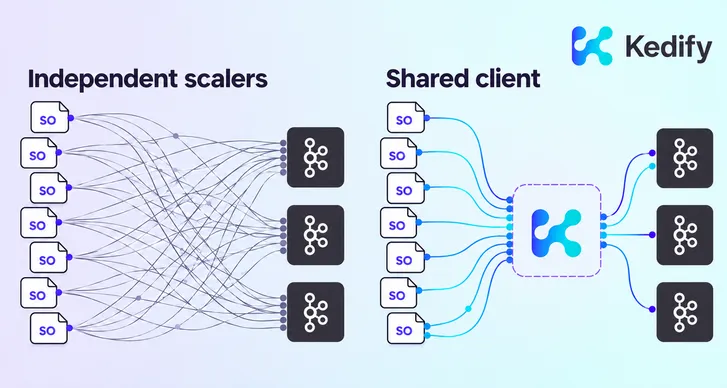
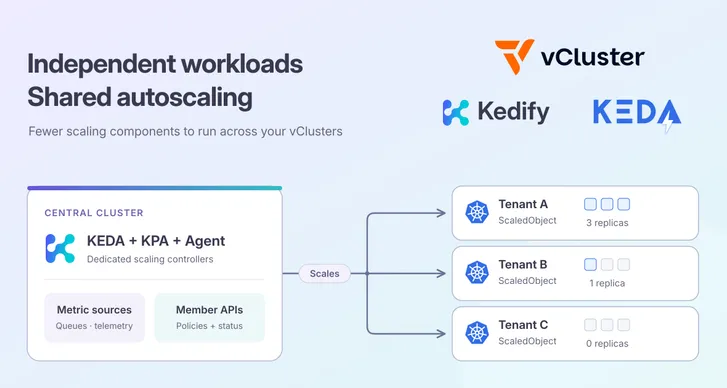
A platform with ten small vClusters can end up maintaining ten KEDA installations, even when each tenant has only a handful of workloads. Add another tenant, and there is another autoscaler to deploy, configure, and upgrade.
With Kedify’s multicluster feature , you run KEDA centrally in the host cluster and application teams create ordinary
 ScaledObject resources alongside their workloads inside each vCluster. The central controllers read those policies and scale the member workloads through their virtual Kubernetes APIs. You do not need to run KEDA in every vCluster.
Each tenant keeps its own targets, metrics, authentication, and replica limits. A busy tenant can scale out while another stays idle. The platform team maintains one autoscaling installation for the fleet.
Ten tenants, one autoscaling installation to maintain
Moving controllers to the host removes repeated autoscaler deployments and upgrades from tenant provisioning. The vClusters still need the autoscaling CRDs and policy resources, but they do not need KEDA, KPA, or Agent pods of their own.
The distinction is where the controllers run, rather than where application teams declare their policies:
| Resource or responsibility | In the host cluster | In each vCluster |
|---|---|---|
| Controllers | Kedify Agent, KEDA, and KPA | No autoscaler controller installation |
| Connection management | ClusterRegistration and managed connection credentials | Native vCluster API and kubeconfig export |
| Scaling policy | Central controllers reconcile member policies | Ordinary ScaledObject next to its target |
| Authentication | KEDA reads through the member API | TriggerAuthentication, ClusterTriggerAuthentication, and referenced Secrets |
| Replica control | Central KPA calculates and applies replica changes | Generated KPA resource and workload Deployment |
Application traffic follows its usual path. The central Agent does not sit between clients and tenant applications.
A new tenant joins through its existing vCluster resources
Enable dedicated mode and discovery in the host installation’s maintained Helm values:
global: features: multicluster: enabled: true type: dedicated vClusterDiscoveryEnabled: truekeda: enabled: truekpa: enabled: trueThe Agent discovers hosted vClusters through their native kubeconfig Secrets and Services. It copies the live central KEDA/KPA CRDs into each member, waits for them to become established, and creates a managed connection Secret and ClusterRegistration in its installation namespace. Central KEDA and KPA then connect to ready registrations.
There is no per-tenant registration command or manual kubeconfig copy. The Agent reuses the native tenant-admin export, connects through the internal Service with TLS verification, refreshes managed credentials when the export changes, and removes the managed registration when its source disappears. The native export remains available for normal vCluster access.
Familiar ScaledObjects, independent scaling
Apply an ordinary ScaledObject in the same vCluster and namespace as its target Deployment. For example, this policy scales worker between one and five replicas using CPU utilization:
apiVersion: keda.sh/v1alpha1kind: ScaledObjectmetadata: name: worker namespace: scaling-demo annotations: autoscaling.kedify.io/class: kpaspec: scaleTargetRef: name: worker minReplicaCount: 1 maxReplicaCount: 5 triggers: - type: cpu metricType: Utilization metadata: value: '70'The Deployment must declare CPU requests, and its member API must provide pod metrics. For shared-node vClusters, enable integrations.metricsServer.enabled=true to forward working host CPU and memory metrics into the member. This setting does not install metrics-server on the host. Private-node vClusters need metrics for their own nodes.
Central KEDA reads the ScaledObject and creates a KPA resource inside that member. Central KPA evaluates the member’s metrics and updates the member Deployment’s scale.
Kedify’s multicluster feature supports cluster-internal metrics (CPU and memory) as well as external triggers with the standard authentication mechanisms KEDA offers. Central KEDA reads trigger configuration and authentication resources through member-scoped clients, so application credentials can remain within the tenant. The metric endpoint must be reachable from central KEDA. If you deploy a metric source inside a vCluster, expose it to the host cluster, because cluster-local Service DNS is not automatically proxied.
A smaller autoscaling footprint
For 10 vClusters with 50 ScaledObjects each (500 total), sharing controllers also reduces the resources reserved for autoscaling. Here is a comparison using the charts’ default CPU and memory requests:
| Standard KEDA in each vCluster | Kedify on the host |
|---|---|
| 30 autoscaler pods | 6 autoscaler pods |
| CPU requests: 3 vCPU | CPU requests: 0.41 vCPU |
| Memory requests: 2.9 GiB | Memory requests: 0.7 GiB |
That is about 86% less requested CPU and 76% less requested memory, freeing roughly 2.6 vCPU and 2.2 GiB of scheduling capacity for application workloads.
Every additional vCluster adds another 0.30 vCPU and 300 MiB of local KEDA requests. With Kedify, you share the controller pool and size it for the aggregate load, avoiding another complete autoscaler installation for every new tenant. The duplicated base footprint you avoid grows with the fleet.
Try it with two vClusters
The dedicated vCluster scaling tutorial walks through discovery, registration, member ScaledObjects, and CPU load. Increase demand in one member and verify that its workload scales while the other remains at its own replica count.
This setup works well for small customer tenants, team platforms, and short-lived development environments. Size the central controllers for the fleet’s policy count, metric queries, and API watches, and plan their availability. Shared-node workloads still depend on host capacity.
Make autoscaling a shared platform capability
Keep ScaledObjects with each tenant and run Kedify autoscaling centrally
Get Started