 All Posts
How to Autoscale GPU and LLM Workloads on Kubernetes
by Elieser Pereira
November 05, 2025
Scaling AI and ML Workloads Without Blowing Up Your Cluster
To autoscale GPU and LLM inference workloads on Kubernetes with Kedify, scale the serving Deployment from HTTP request rate or concurrency, and route requests through an Endpoint Picker referenced by an InferencePool. GPU node capacity and model readiness must be configured separately.
In this post, we’ll walk through why Kubernetes is a natural place for AI workloads, what challenges teams face when scaling, and how Kedify helps teams scale LLM inference efficiently using our HTTP scaler with vLLM. For proof from production workloads, see how Amigo scaled healthcare AI workloads with Kedify.
Why Run AI Workloads on Kubernetes?
If your organization is already using Kubernetes, it makes sense to host your AI/ML workloads there too. Here’s why:
-
Unified infrastructure - Running AI workloads on Kubernetes means one less environment to manage. Your platform team can apply existing tooling, policies, and automation without managing separate infrastructure for machine learning.
-
Cost control - Hosted AI services are often opaque and expensive. Running your own inference workloads in Kubernetes gives you visibility and control over GPU usage, making it easier to optimize spend and avoid vendor lock-in.
-
Security and compliance - Some AI workloads process sensitive or regulated data. Keeping these workloads in your own cluster allows tighter control over data residency, access policies, and audit requirements.
-
Flexibility - Kubernetes lets you run any AI framework or model that fits your needs. Whether you’re using PyTorch, TensorFlow, vLLM or llm-d, you’re not limited by vendor offerings.
Challenges and Risks of Scaling AI Workloads
While Kubernetes provides a solid foundation, scaling AI workloads comes with unique challenges:
-
Pricing - GPUs are powerful but expensive. Even small amounts of waste can balloon your infrastructure bill. Overprovisioning leads to idle resources, while underprovisioning causes latency spikes or failed requests.
-
Complexity - Deploying and scaling AI systems properly requires managing workloads with specific requirements that can be deployed by different tools in different ways. The industry lacks standardized approaches for LLM autoscaling.
-
Lack Of Standardization - The inference and serving landscape is ever-changing and can be overwhelming. Many teams rely on CPU-based autoscaling, but this doesn’t reflect GPU workload behavior, leading to inefficient scaling decisions.
vLLM for Inference at Scale
Real-time LLM inference is where autoscaling gets especially difficult. Models like LLaMA, Mistral, or GPTs consume significant memory and compute. Even with the many optimizations available you end up managing GPUs, traffic periodicity and user expectations for instant responses.
On the ever-growing landscape of LLM tools, the community seems to agree that vLLM solves many of the serving issues we have described so far. It’s a fast, open-source inference engine for LLMs that maximizes GPU utilization with techniques like PagedAttention, KV Cache aware routing, and Prefill/Decode Disaggregation.
But it doesn’t solve autoscaling by itself.
Kedify + vLLM: Autoscaling That Just Works
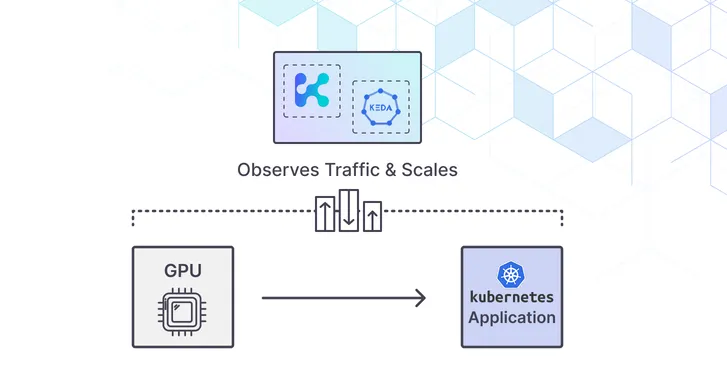
Kedify is a managed autoscaling layer built on KEDA, designed to scale modern workloads like LLM inference cleanly and efficiently.
Here’s what Kedify brings to the table when used with vLLM:
-
HTTP autoscaling based on actual demand - Kedify’s HTTP scaler supplies request-rate or concurrency metrics to KEDA for scaling the vLLM Deployment. Choose a target that matches the serving capacity of your model.
-
Inference-aware routing - Kedify Proxy connects to an existing Endpoint Picker through the
InferencePool. The Endpoint Picker’s configured routing policy determines how signals such as KV cache availability influence backend selection. -
Latency and throughput tuning - Measure latency and throughput under load when choosing request-rate or concurrency targets. These HTTP scaling targets do not eliminate GPU allocation or model-loading delays.
-
GPU cost controls - Bound the replica count to fit available GPU capacity. Scale-to-zero can reduce idle serving replicas, but GPU node provisioning and the tradeoff between cold-start latency and idle capacity need separate planning.
Example: LLM Inference with Kedify + vLLM
Serving a model with vLLM can be done simply by running the vLLM production-stack project or can also be done with llm-d model-service charts for complex distributed inference setups.
For vLLM deployments with an existing InferencePool and Endpoint Picker, Kedify’s HTTP scaler connects inference routing to Deployment autoscaling.
Setting Up Kedify HTTP Scaler with vLLM
Here’s how to configure autoscaling for your LLM inference workloads:
One of the most interesting features in the Kedify HTTP scaler is the capacity to use an EndpointPicker (EPP).
In the cloud native inference and serving landscape, an Endpoint Picker or Inference Scheduler routes traffic to the vLLM instance that has the greatest chance to provide better and quicker answers.
This is possible because the Endpoint Picker is aware of vLLM instance status and shared cache when available. Internally, the EPP forwards requests to instances with the greatest possibility to have cache hits.
EPP considers variables like:
- Scorers
- Filters
- KV cache
- Prefill/Decode type instances
vLLM Deployment
In this scenario, there is no automation or autoscaling involved. For having autoscaling available you can use the Kedify HTTP scaler as shown in the following section.
vLLM + Kedify
A typical use case assumes that you have the Kedify agent, which ensures all KEDA resources are available in your cluster.
Please note that for advanced use cases, tools available in the landscape mostly require you to use Gateway API.
We know this can be a limitation for some companies still serving their workloads through Ingress.
Scaling vLLM without Gateway API
Kedify’s HTTP scaler can connect an Ingress route to an Endpoint Picker without requiring Gateway API for that route. Deploy the model, InferencePool, Endpoint Picker, and a Service with selectors matching the pool before configuring the scaler.
Set inferencePool in the ScaledObject trigger metadata to identify the existing pool, and use trafficAutowire: ingress for the documented Ingress integration. Kedify manages proxy wiring; it does not install the model or Endpoint Picker. Follow the complete Ingress inference setup to install the dependencies and verify requests end to end.
The ScaledObject also provides scaling targets that help autoscale the vLLM deployment.
Example ScaledObject
kind: ScaledObjectapiVersion: keda.sh/v1alpha1metadata: name: inferencepool namespace: inferencepool-namespacespec: scaleTargetRef: apiVersion: apps/v1 kind: Deployment name: vllm-deployment cooldownPeriod: 6 minReplicaCount: 1 maxReplicaCount: 10 fallback: failureThreshold: 2 replicas: 1 advanced: restoreToOriginalReplicaCount: true horizontalPodAutoscalerConfig: behavior: scaleDown: stabilizationWindowSeconds: 5 triggers: - type: kedify-http metadata: hosts: application.keda pathPrefixes: /v1 service: vllm-deployment-service port: '8000' inferencePool: inferencepool scalingMetric: requestRate targetValue: '500' granularity: 1s window: 10s trafficAutowire: ingressThe names and scaling values above are illustrative. Replace them with your deployed resources and measured serving capacity; use the HTTP scaler configuration reference when tuning the trigger.
Final Thoughts
Running AI workloads in Kubernetes unlocks cost savings, flexibility, and unified infrastructure. This comes with extra management complexity and without the right autoscaling strategy, it’s easy to waste GPU hours or deliver a poor user experience.
Kedify with the HTTP scaler gives you a purpose-built solution for LLM inference scaling. It combines the flexibility of vLLM with the precision of workload-aware autoscaling and routing, so you can focus on building AI products without babysitting your cluster.
Related Kedify resources
- How Amigo scaled AI workloads in healthcare with Kedify
- AI inference autoscaling use case
- Predictive scaler overview
- KubeCon talk on autoscaling LLM workloads
Want to see Kedify in action?
Book a call with our team. We’ll show you how to get started scaling LLM workloads smarter and faster.