 All Posts
Canaries on Autopilot: Argo Rollouts with the Kedify HTTP Scaler
by Jan Wozniak
June 16, 2026
Introduction
Canary deployments are a confidence trick. You inch a new version forward (5%, 20%, 50%) and watch your error budget while you do it. The trick only works if you can move two things in lockstep: the traffic split (what fraction of users hit the new version) and the capacity (do those pods have enough headroom to actually absorb the traffic?). When those two move on different schedules, even a perfectly orchestrated canary can fail for boring reasons. The canary is throttled before it gets a chance to misbehave, or stable pods sit idle while the canary’s HPA still hasn’t caught up.
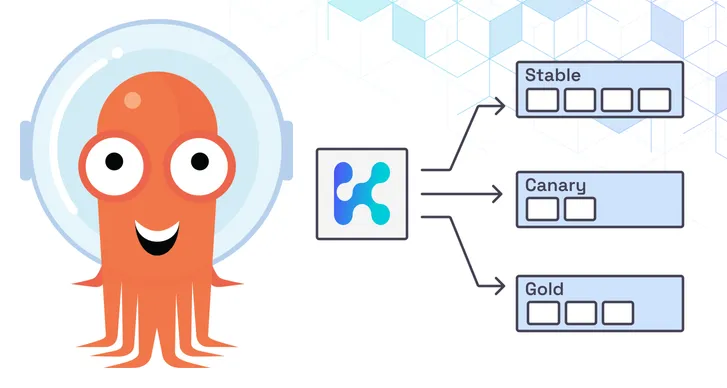
The Kedify Argo Rollouts plugin closes that gap. A single ScaledObject and a single Argo Rollout co-own both decisions: KEDA manages capacity through the Rollout’s /scale subresource, and the plugin drives traffic split through kedify-proxy.
In this post we’ll walk through the failure mode this addresses, show how the plugin wires Argo Rollouts into Kedify’s HTTP scaling path, and look at a few use cases that fall out of the design.
The decoupled-canary problem
Imagine you run a small, fast-growing publisher; let’s call it MangoPress. Your busiest endpoint is the article-recommendation API. It fans out across a few backends, calls a couple of ML models, and serves about 1.5k requests per second at peak. Today your team scales it on requestRate with the Kedify HTTP scaler:
triggers: - type: kedify-http metadata: hosts: api.mangopress.io port: '80' scalingMetric: requestRate targetValue: '50'Stable replicas float between 6 and 30, and on a quiet Tuesday at 3am they happily scale to zero.
Now the ML team wants to ship recommender-v2. You don’t want to flip the switch all at once. You want a 20 / 50 / 80 canary with a 30-second pause at each step, and an immediate abort if 5xx ticks above baseline.
Without coordinated scaling, here’s what tends to happen. A hand-rolled traffic-split script flips Ingress weights to 20%. The canary Deployment runs its own autoscaler with maxReplicaCount=5, sized for what looks like a reasonable share of yesterday’s peak. Then mid-canary, an article on the home page goes viral and traffic to the recommendation API jumps from 1.5k to 5k req/s in under a minute. 20% of that lands on the canary, the canary’s requestRate target is 50 (so it would want 20 pods), but its separate maxReplicaCount caps it at 5; five pods serve roughly 250 req/s before saturating, tail latency blows past your SLO, and the Rollout’s analysis step aborts. The failure was capacity-shaped, not code-shaped. You haven’t actually learned anything about v2.
The fix isn’t bigger guard-rails on the canary. It’s letting capacity follow the traffic split.
How the plugin wires it together
The Kedify Argo Rollouts plugin (kedify/http) is an Argo Rollouts traffic-router plugin . It runs inside the
 argo-rollouts controller pod and is called every time the Rollout advances a canary step.
When the Rollout reaches setWeight: 20, the plugin patches an internal HTTPScaledObject (the dynamic configuration source for kedify-proxy). kedify-proxy then sends 80% of traffic to the stable service and 20% to the canary, on the same data plane that already handles the rest of your HTTP traffic. No Ingress edits, no controller restart, no leftover state on the load balancer. When setWeight reaches 0 (full promotion or abort), kedify-proxy reverts to a single-cluster route.
Capacity comes free with the design. The ScaledObject targets the Rollout, not a Deployment:
apiVersion: keda.sh/v1alpha1kind: ScaledObjectmetadata: name: recommenderspec: scaleTargetRef: apiVersion: argoproj.io/v1alpha1 kind: Rollout name: recommender minReplicaCount: 2 maxReplicaCount: 30 triggers: - type: kedify-http metadata: hosts: api.mangopress.io port: '80' scalingMetric: requestRate targetValue: '50' trafficAutowire: ingressA few concrete recommendations for the trigger:
- No
servicefield. Thekedify-httpscaler resolves bothstableServiceandcanaryServicefrom the Rollout spec; one trigger covers both backends, and any change to the Rollout is reflected automatically. - One capacity envelope. Set
minReplicaCountandmaxReplicaCountonce, on theScaledObject. KEDA scales the Rollout via its/scalesubresource and Argo Rollouts owns the stable-vs-canary replica split internally, so a 50/50 step does not double your replica budget. trafficAutowire: ingress. Lets the scaler manage the Ingress backend swap tokedify-proxyfor you. Drop it (and point your Ingress atkedify-proxydirectly) if you’d rather wire the route by hand for stricter GitOps reconciliation.
The 20% step then lifts both sides of the canary together (stable replicas drift down, canary replicas come up), and the total fleet capacity stays governed by the same requestRate signal that drives the rest of your traffic.
Back at MangoPress, that’s the difference between an aborted rollout and a normal one. When traffic spikes to 5k req/s mid-canary, the same requestRate signal lifts both sides together: KEDA scales the Rollout up, and Argo Rollouts gives each side of the split its share of new pods. The canary’s error budget then reflects v2’s behavior, not the capacity gap that would have buried it under decoupled scaling.
Run progressive deliveries without a second autoscaler.
Try Kedify with Argo Rollouts today.
Get StartedSetting it up
The shortest path is two Helm releases.
1. Install Argo Rollouts with the kedify/http plugin pre-registered and the controller’s RBAC extended for HTTPScaledObject.
controller: trafficRouterPlugins: - name: 'kedify/http' location: 'https://github.com/kedify/argo-rollouts-plugin/releases/download/v0.0.1/rollouts-plugin-kedify-linux-amd64' sha256: '6cd7597788f9ceeee3406695b64022c63ddb77e9b946dd0295bf10969b985814'providerRBAC: additionalRules: - apiGroups: ['http.keda.sh'] resources: ['httpscaledobjects'] verbs: ['get', 'list', 'watch', 'patch']The controller.trafficRouterPlugins should match the OS/arch of the node running the controller; the release page lists checksums for linux-amd64, linux-arm64, and the macOS variants. providerRBAC.additionalRules appends to the controller’s existing ClusterRole, so the rollouts ServiceAccount picks up httpscaledobjects access without an extra binding.
If you didn’t use Helm, the same wiring can be applied directly on YAML manifests. Patch the controller’s ConfigMap to register the kedify/http plugin:
apiVersion: v1kind: ConfigMapmetadata: name: argo-rollouts-config namespace: argo-rolloutsdata: trafficRouterPlugins: |- - name: 'kedify/http' location: 'https://github.com/kedify/argo-rollouts-plugin/releases/download/v0.0.1/rollouts-plugin-kedify-linux-amd64' sha256: '6cd7597788f9ceeee3406695b64022c63ddb77e9b946dd0295bf10969b985814'The trafficRouterPlugins should match the OS/arch of the node running the controller; the release page lists checksums for linux-amd64, linux-arm64, and the macOS variants.
Add the matching rule to the existing argo-rollouts ClusterRole so the controller can patch the resources backing kedify-proxy:
- apiGroups: ['http.keda.sh'] resources: ['httpscaledobjects'] verbs: ['get', 'list', 'watch', 'patch']Then kubectl rollout restart deploy/argo-rollouts -n argo-rollouts. The controller fetches the plugin binary on startup and verifies the checksum before loading it. Checksums for other architectures live on the release page.
2. Install Kedify via the Kedify Helm chart, following the quickstart. KEDA, the HTTP add-on, and kedify-proxy come from a single chart release; nothing about the canary path needs additional values overrides.
3. Reference the plugin in your Rollout’s trafficRouting:
apiVersion: argoproj.io/v1alpha1kind: Rolloutmetadata: name: recommenderspec: strategy: canary: stableService: recommender-stable canaryService: recommender-canary trafficRouting: plugins: kedify/http: httpScaledObjectName: recommender steps: - setWeight: 20 - pause: { duration: 30s } - setWeight: 50 - pause: { duration: 30s } - setWeight: 80 - pause: { duration: 30s }That’s it. No Ingress weighting, no virtual service, no second autoscaler.
Use cases this enables
Canary releases that scale to zero. With minReplicaCount: 0, the stable side can sleep through quiet hours. The first canary step still works correctly: Kedify’s request-rate signal pulls capacity up the moment traffic arrives, and kedify-proxy immediately starts routing the configured share to the canary.
Capacity-aware canaries on a single budget. The maximum fleet size is set once, on the ScaledObject. A 50/50 split doesn’t double your bill, and you never risk a runaway canary blowing through a separately-tuned maxReplicaCount on the canary Deployment.
Fast, clean aborts. kubectl argo rollouts abort flips setWeight back to 0. kedify-proxy reverts to a single-cluster route within seconds and the Rollout scales the canary deployment back down through its normal reset path. There’s no orphaned weighted route to clean up by hand and no Ingress to revert.
GitOps-friendly traffic management. Traffic weights live only in the running Argo Rollout, not as a separate piece of configuration. Your Git repo stores the Rollout’s step list (the source of truth for the canary policy) and nothing else. ArgoCD won’t fight the controller over a moving Ingress weight.
Conclusion
Canary deploys are easier when one controller can move both traffic and capacity at the same time. The Kedify Argo Rollouts plugin gives you that loop without a second autoscaler or a hand-rolled traffic-split script.
A complete, runnable example (Rollout, Services, Ingress, ScaledObject, and RBAC) lives in the kedify/examples repo under samples/argo-rollouts-canary. The plugin source and release binaries live at kedify/argo-rollouts-plugin. Installing Kedify takes no more than 5 minutes; the plugin slots in on top.